Your server,
mapped and deployed.
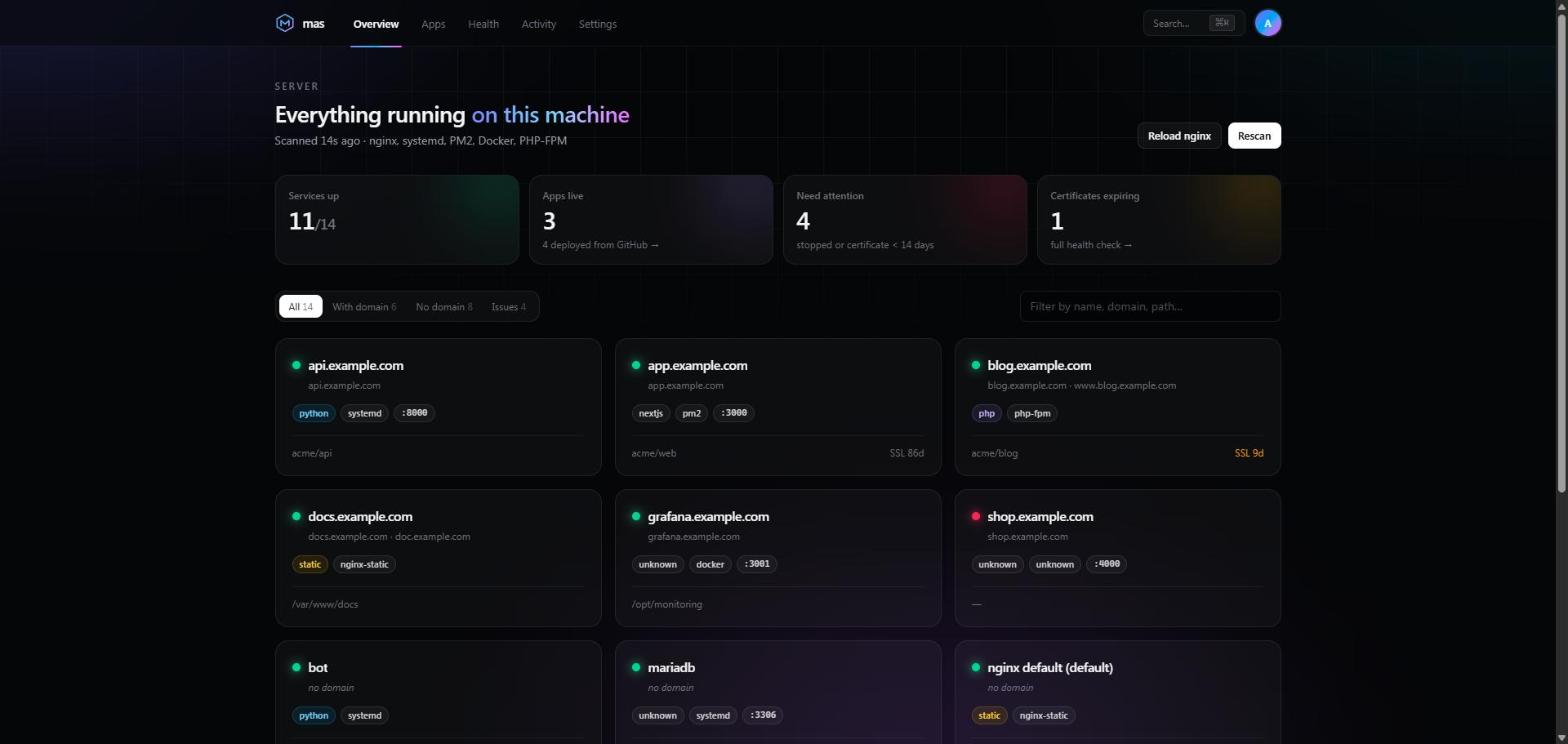
Mas is a self-hosted dashboard that adopts what already runs on your Debian + nginx box, PHP sites, PM2 apps, systemd units, Docker containers, then deploys from GitHub on every push. Nothing gets reinstalled.
Debian 12+ · nginx · runs on the box you already have
Adopts what you already run
Point it at a server that has run for years.
Mas reads nginx vhosts, listening ports, /proc, systemd, PM2 and the Docker socket, then tells you what runs, where, for which domain, under which user and from which git repository. Every detection is deterministic parsing. No AI model, no agent to install elsewhere, and the scan never writes a byte.
How a vhost becomes a service
Each hop is a file or a syscall you could check by hand.
| Service | Type | Manager | Port | SSL | Git | |
|---|---|---|---|---|---|---|
| ● | api.example.com | python | systemd | 8000 | 86d | gh:acme/api@main |
| ● | app.example.com | nextjs | pm2 | 3000 | 86d | gh:acme/web@main |
| ● | blog.example.com | php | php-fpm | - | 9d | gh:acme/blog@main |
| ● | grafana.example.com | unknown | docker | 3001 | 61d | - |
| ● | shop.example.com | unknown | unknown | 4000 | 72d | - |
| ● | docs.example.com | static | nginx-static | - | 44d | - |
| … |
From inventory to push-to-deploy.
Start by seeing what you have. Then hand Mas the parts you want it to manage, one service at a time.
Deploy from GitHub on every push
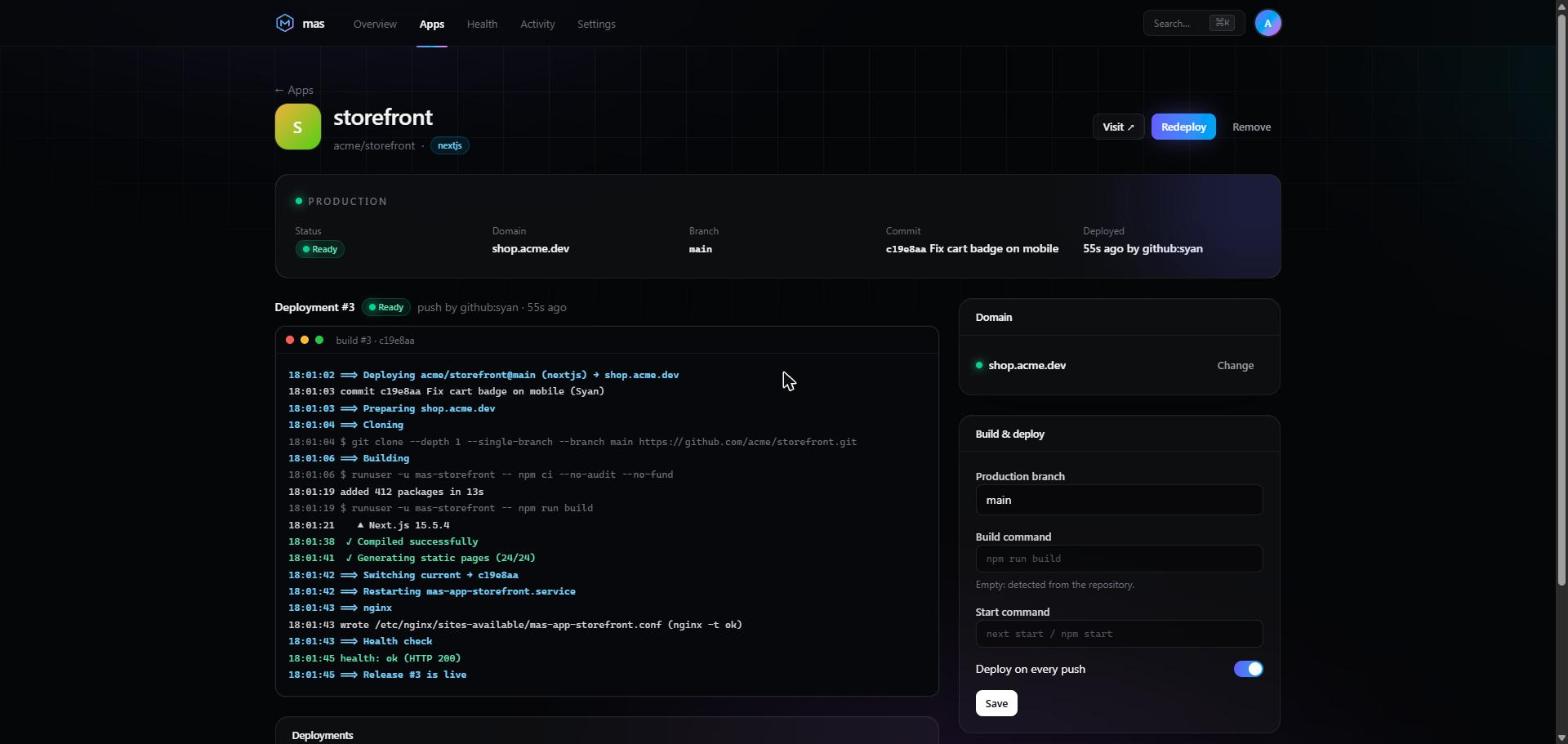
Vercel-style, on your own machine. Atomic releases, a generated systemd unit and nginx vhost, Let's Encrypt, a health check and automatic rollback when it fails.
Health checks that explain
Broken certbot lineages, expiring certificates, standalone renewals that stop nginx, vhosts pointing to missing certs, domains resolving elsewhere. Each comes with the fix; Mas never applies it for you.
Domains from your registrar
Connect OVH, Cloudflare, Gandi, Hetzner, DigitalOcean or Porkbun. Mas creates the A/AAAA record, waits for it to resolve, then issues the certificate. It never deletes a record.
Self-hosted Supabase
One click installs the official stack. Ports bound to 127.0.0.1, only the public API published over HTTPS, Studio kept private, daily pg_dump.
Adopt in place
A detected service that is already a GitHub checkout gets Connect to GitHub. Mas deploys it where it lives, through its current manager, and resets to the previous commit if the health check fails.
CLI and dashboard
Everything from mas scan to mas rollback in the terminal, or from a web dashboard with password + 2FA, light and dark themes, and ⌘K to jump anywhere.
Built for the server you already have.
Coolify, Dokploy and CapRover are great, but they want a clean server: everything in their containers, behind their proxy. Mas starts from the other end.
| Coolify / Dokploy / CapRover | Mas | |
|---|---|---|
| Starting point | Fresh server | ✓Your existing server |
| Reverse proxy | Traefik / Caddy (theirs) | ✓Your nginx, your vhosts |
| Runtimes | Docker only | ✓PHP-FPM, systemd, PM2, Docker, static |
| Existing apps | Re-deploy them | ✓Detected and adopted in place |
| Detection | n/a | ✓Deterministic parsing, no AI |
git push, and it's live.
Create a GitHub App in one click from the dashboard (manifest flow, minimal read-only permissions), pick a repository and a branch, and every push goes through the same seven steps.
- Clone the pushed commit into its own release folder; the token goes through the environment, never on the command line.
- Build as a dedicated mas-<app> user: npm, a Python venv, composer, or your own command.
- Switch the current symlink atomically.
- Restart a generated, sandboxed systemd unit listening on 127.0.0.1.
- Route through an nginx vhost from a template: backup, nginx -t, reload.
- Secure with certbot if the domain has no certificate yet.
- Verify with an HTTP health check. If it fails, the previous release is put back.
The last 5 releases are kept. mas rollback <app> puts any of them back.
It runs as root, so it behaves.
Mas has to read /proc for every user and restart services. So the agent is sandboxed by systemd, writes only where it must, and treats every change as reversible.
Read-only discovery
Scans never write. The test suite hashes the whole fixture tree before and after a scan and allow-lists every command.
Allow-listed actions
A strict (manager, action) → argv table, executed without a shell. Every action and its output lands in the audit log.
nginx -t, always
Generated files are backed up first and nginx only reloads after a successful nginx -t.
Password + 2FA
TOTP with any authenticator app, __Host- session cookie, rate-limited checks. The dashboard can stay behind an SSH tunnel.
Sandboxed apps
Each app runs as its own non-root user with NoNewPrivileges, ProtectSystem, no capabilities, on loopback.
Secrets stay secret
Encrypted at rest, 0600 files. Credentials found in git remotes or PM2 env are neither stored nor shown.
Full details in the security model and SECURITY.md.
Three commands. One server.
On Debian 12+, as root. The installer is idempotent: it asks for an admin password, shows a QR code for 2FA, and optionally serves the dashboard on your domain with a Let's Encrypt certificate. Leave the domain out to keep it private behind an SSH tunnel.
$ git clone https://github.com/SyanCode/Mas.git /opt/mas-install$ cd /opt/mas-install$ sudo ./deploy/install.sh --domain mas.example.com --email you@example.com
sudo mas self-updatessh -L 7070:127.0.0.1:7070 you@serverBuilt in the open, phase by phase.
Detection
Collectors, correlation, type detection, mas scan --json.
Dashboard & management
API, 2FA, background scan, logs, allow-listed actions, audit log, installer.
Health checks
Certificates, certbot renewal, nginx, DNS: mas doctor.
Deploy from GitHub
GitHub App, signed webhooks, atomic releases, rollback, live build logs, adoption.
Next
Preview deployments per pull request, 2FA recovery codes, notifications.
Open source, MIT, and waiting for your server.
Read the code, try it on a box you can restore, and open an issue with what it found. Feedback shapes the next phase.